MQTT
Virtual Triggers
Each of the 27 internal triggers has a corresponding externally controllable vTrigger, set through MQTT or the REST API. Each vTrigger contributes its Boolean state (0/1) to the matching internal trigger.
State Persistence
Two ways preserve state across a reboot:
- Publish MQTT trigger commands with retain. When the BSC reconnects, the broker restores the last published state.
- Mark individual vTriggers persistent in the BSC's System / MQTT settings.
MQTT Example
vTriggers are not initially visible in tools such as MQTT Explorer; they appear after being set externally.
MQTT Address
{Device Name}/input/vtrigger/{Trigger Number}
Device Name is MQTT Device Name from System settings. Trigger Number is 1–27.
Payload
0 = trigger low; 1 = trigger high.
Home Assistant Auto-Discovery
Built-in auto-discovery creates Home Assistant entities for known values at the press of a button, avoiding manual YAML maintenance.
-
Home Assistant Discovery Prefix
-
- Home Assistant Discovery Prefix: Discovery topic prefix, default
homeassistant. - Send HA Discovery: Publishes discovery messages.
Manual Setup Remains Available
The YAML method below remains useful for special cases and customisations. Built-in discovery is recommended for standard integration.
MQTT Filters
Select what is published to reduce unnecessary traffic and keep topics manageable.
Data Devices
-
Publish data devices
-
Select data devices
-
Data classesThe valid and maintenance topics are always published.
-
- Send Data Devices: Enabled by default.
- Data Devices selection: Devices to publish.
- Data classes: All 7 enabled by default: total voltage/current, SoC and FET state; cell voltages; other cell data; balancing data/status; errors/warnings; temperatures; capacity/energy/statistics.
The valid and maintenance topics are always published, regardless of class selection.
Group Devices
-
Publish group devices
-
Select group devices
-
Data classesThe valid and maintenance topics are always published.
-
Same structure: enable publishing, select groups and data classes. Relevant only when group devices are enabled.
Other Data
-
Publish MQTT data
-
OneWire, Inverter, Trigger and System are enabled by default. System includes free heap and task states. Cell voltage drop (Debug) publishes diagnostics from cell-voltage-during-charging monitoring and is off by default.
MQTT with Home Assistant
Integration
For maintainable configuration.yaml, use separate MQTT configuration files, for example one per device.
Usually Unnecessary with Discovery
Built-in auto-discovery normally replaces manual configuration.
Add to Home Assistant's config/configuration.yaml:
mqtt:
  - sensor: !include_dir_merge_list mqtts/
Create the mqtts directory manually and put the individual .yaml files there. Home Assistant reads them at startup.
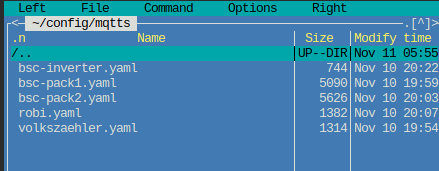
Example Configurations
Examples cover internal BSC values, BMS, inverter and NEEY balancer.
Adapting the Files
Rename downloaded .txt files to .yaml for use with Home Assistant.
Data Devices
Replace {DataDeviceName} with the configured plain-text name from BSC data-device mapping.
Unique IDs
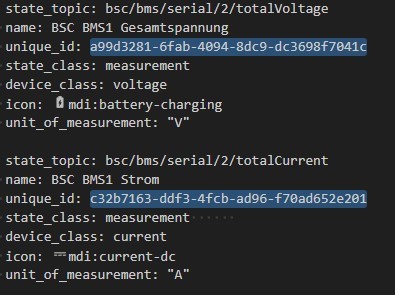
Assign a unique ID to each sensor. You can generate UUID version 1 at https://www.uuidgenerator.net/version1. Alternatively, use Home Assistant's Visual Studio Code Server add-on, or VS Code with UUID Generator by netcorext:
- Select placeholder
xxxxx-xxx-xxx-xxx-xxxxx. - Right-click Change All Occurrences.
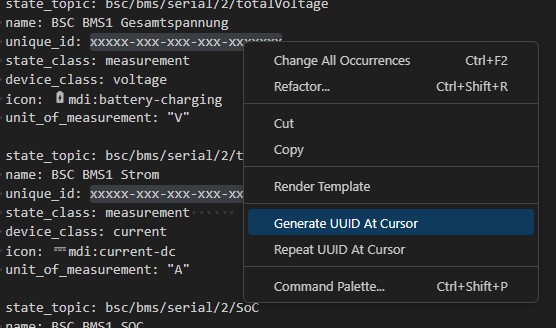
- Right-click Generate UUID at Cursor, then save.
Files
Moving Existing MQTT Configuration
Move an existing dedicated mqtt.yaml from the configuration root into mqtts. Remove its top-level sensor: key and shift the remaining definitions one indentation level left.
- state_topic: bsc/inverter/chargeCurrentSoll
  name: DC charging current setpoint
  unique_id: xxxxx-xxx-xxx-xxx-xxxxxxx
  state_class: measurement
  device_class: current
  icon: mdi:current-dc
  unit_of_measurement: "A"
  device:
    identifiers: ["BSC-Inverter"]
    manufacturer: "BSC"
    model: "BSC"
    name: "BSC-Inverter"

- state_topic: bsc/inverter/dischargeCurrentSoll
  name: DC discharging current setpoint
  unique_id: xxxxx-xxx-xxx-xxx-xxxxxxx
  state_class: measurement
  device_class: current
  icon: mdi:current-dc
  unit_of_measurement: "A"
  device:
    identifiers: ["BSC-Inverter"]
    manufacturer: "BSC"
    model: "BSC"
    name: "BSC-Inverter"
Creating a vTrigger Switch
Add this example to Home Assistant's configuration.yaml, adapting it to your system. It controls vTrigger 1:
mqtt:
  - switch:
      unique_id: xxxxx-xxx-xxx-xxx-xxxxxxx
      name: "BSC Autobalance"
      state_topic: "bsc/trigger/1"
      command_topic: "bsc/input/vtrigger/1"
      payload_on: "1"
      payload_off: "0"
      state_on: "1"
      state_off: "0"
      qos: 0
      retain: false
      optimistic: false
The switch displays internal trigger 1 state. To display the vTrigger state instead, replace trigger with vtrigger in state_topic.